Quick answer
An app-controlled vibrator pairs with a compatible phone so you can adjust settings in the app. Some models also let a partner connect over the internet. For long-distance use, confirm that the exact model supports remote partner control, what each person needs to join, and how either person can stop.
How does an app-controlled vibrator work?
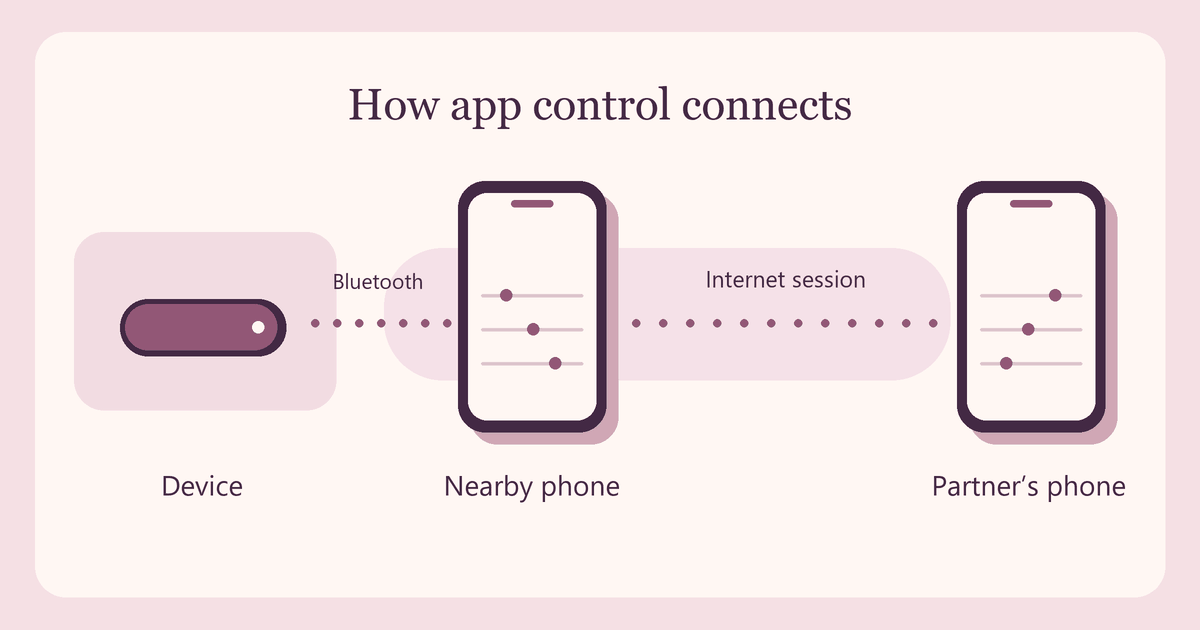
The physical device and the app have separate jobs. The device has a motor and onboard controls that vary by model. The app can give you a more detailed interface for adjusting speed or intensity, switching patterns, or sharing access. Usually the app talks to the device over Bluetooth while the phone is nearby. Some manufacturers then use the phone’s internet connection to bring in a partner in a different location.
- Device
Pairs over Bluetooth - Nearby phone
Runs the supported app - Partner’s phone
Joins the internet session
Here, pairing means connecting the device to the phone physically beside it. Remote partner control means letting a person elsewhere join through the manufacturer’s app or a documented link. The two connections can fail independently. If the device disappears from the nearby phone, check pairing before you resend the invite. If the nearby phone can still control it, check how the other person joined. We-Vibe Sync Lite connection diagram.
What can the phone app add?
The most useful benefit depends on how you want to use the device. For nearby control, the app can put adjustments on a screen instead of asking you to cycle through settings on a small button. Some apps save custom patterns for later. If you’re shopping for that feature, check whether the app lets you save your own pattern, whether it works with your model, and where it’s stored. Lovense Remote features.
For adults in different places, supported remote control can make a connected device part of a planned call or other shared time. The person with the device starts a session or shares an invitation. Each of you should know how to pause before you start. If you mainly want a nearby controller or prefer fewer setup steps, check whether the model also has usable onboard buttons or comes with a separate remote. Those controls are worth evaluating on their own.
- Choose local control when the device and controlling phone will be close together.
- Choose a documented internet mode if a partner will join from elsewhere.
- Check physical controls if you want to pause, change modes, or end the session without opening the app.
What does joining look like across brands?
Start with the joining method. An invitation can lead to an app workflow or a browser controller. Even within a brand, those can be separate modes with different features. Here are three documented examples to help you read a product listing. We reviewed manufacturer instructions for this guide. We haven’t tested these devices side by side.
| Brand and mode | Person with the device | Partner joining remotely |
|---|---|---|
| ENJOX Remote Live Control | Pairs the device in the app and creates a control link. | Opens the one-time link. ENJOX says both people need stable internet. Live Control instructions |
| Lovense Remote Control Link | Creates a link in Lovense Remote and chooses the available settings. | Can open a documented Control Link without installing software. Other Lovense modes may require the app. Control Link instructions |
| We-Vibe Long Distance Play | Pairs a supported device and invites the other person into a partner session. | Uses the We-Vibe App. We-Vibe says the joining partner can participate without owning a second toy. One-device setup answer |
Example. If you use an iPhone, your partner uses Android, and only one person wants to buy a device, check three things before comparing price: whether the nearby phone supports the app, whether your partner can join on their phone, and whether the exact model supports your chosen mode with one device. If an invite opens in a browser, check whether that route has the features you want. If you both plan to control separate devices, look for a different, explicitly documented two-device mode.
What should each partner check before connecting?
Look up both phones and the exact model. Match the product name on the listing to the model in the support documentation. Open the app listing from each phone so you can see its current operating-system and country requirements. If you need an account, decide who creates one and confirm how to delete it later. If a permission prompt appears, check what the app is asking to do. Apple documents how to review an app’s Bluetooth access. Android lists Nearby devices as a permission used to find and connect with nearby hardware. Apple Bluetooth permissions · Android app permissions.
Agree how to start and stop. Share an invitation only with the person you intend to give access to. Find out whether an invite can be reused, how long it remains valid, and what the app saves about the partner connection. Ending an active session, revoking an invite, and removing a saved partner can be different actions. For example, Lovense’s guide explains how to end an active or waiting unlimited Control Link. Check the current instructions for your own model and mode. Lovense link settings.
Plan a short rehearsal. Test the nearby connection first. Then open a fresh invitation together, agree on a pause signal, and confirm which controls each person can use to end the session. Check what you both see afterward. If the remote link fails, switch to an ordinary call or try again another day. Timing, connection drops, and switching between a call and the app can depend on your phones, app versions and network. A successful test on someone else’s phone is only a clue for your own setup.
What should you look for before buying?
Start with the setting you’ll use most. A nearby-use shopper can prioritize physical controls, charging, size and the app interface. A long-distance shopper should start with the model’s remote mode, each person’s phone and how access stops. If you need a physical remote as a backup, verify what’s in the box. A separate remote can matter if your phone is charging, unavailable, or you prefer to keep it out of the session.
Check the full price with delivery, then read the retailer’s return and replacement terms for the exact item. Unopened returns and defective-product warranties are different policies. Confirm what changes after opening a seal and who handles a defect or exchange. If you’re purchasing a gift, ask the recipient which controls and app permissions they are comfortable using before committing to a model. Example: ENJOX warranty and returns.
Use the checklist below to compare a model. Save or print a copy for each option so you can check what happens after pairing and what you’ll pay at checkout without mixing up the models. The checklist uses this page only and doesn’t make a product-compatibility determination.
Try this buying exercise. Write down where you and your partner will be on a typical evening and which phone will stay beside the device. List the exact app or link the other person will use, then look up the local stop control. Repeat those steps for one alternative. If you can’t answer a question from the manual, copy it into a note for the manufacturer before paying. That comparison is useful even if both devices use similar language on their boxes.
Where should you go next?
- Still comparing options? Start with the Buying Guides hub and fill out the long-distance device buying checklist for the exact model.
- Looking at one specific device? Read our ENJOX Kite guide for a model-specific example of required equipment and purchase terms.
- Already have a device? Start with Setup & Help, then use the pairing and remote troubleshooting guide if you get stuck.
- Want to plan time together first? The virtual-date planner gives you a short agenda with or without a connected device.
Evidence at a glance. This guide is for adult shoppers and owners, using U.S.-facing product information where available. The comparison explains documented connection methods and buyer decisions. Hands-on usability, connection reliability, comfort and noise remain untested. Editorial standards.
Questions and answers
Can someone control a Bluetooth vibrator from another city?
Yes, if the exact model and app support internet-based partner control. Bluetooth usually connects the device to a phone in the same room. The nearby phone and the remote partner then use internet access for the session.
Do both people need to own a device?
No. Some workflows support one device. The person beside it pairs it and the other person joins using the documented app or link. Read the exact one-device instructions before buying a bundle.
Does an app-controlled vibrator need Wi-Fi?
Nearby Bluetooth control and remote internet control have different requirements. A remote session needs a supported internet connection. Check the specific app’s guidance and test mobile data on both phones if that’s what you’ll use.
What happens if the session disconnects?
It depends on the device, app and software. Know how to stop locally and test what both phones show if the connection drops. The manufacturer’s documentation and a deliberate rehearsal are better evidence than a listing that simply says “remote control.”
How do I connect an app-controlled vibrator to my phone?
Charge the device, open the manufacturer’s supported app, review the requested Bluetooth or Nearby devices permission, and follow the pairing instructions for that exact model. Some devices pair inside the app. Check the manual before pairing through the phone’s system menu.